Transform Your SDLC with Agentic Workflows

GitHub Agentic Workflows let you define AI-powered automation in natural language instead of YAML, unlocking a new Continuous AI loop. These workflows allow you to describe intent and convert that intent into actionable tasks executed by AI agents.
- Intent-driven Development
- What Are Agentic Workflows?
- Benefits of Agentic Workflows
- What can you do with Agentic Workflows?
- Anatomy of an Agentic Workflow
- Updating a project when a dependency changes: A real example
- A New Way of Thinking: Intent Over Implementation
- Security considerations
- Tips and Gotchas
- Conclusion
In this post, I’ll show you how GitHub Agentic Workflows fundamentally change the way you should think about automation, and why “Continuous AI” is the next frontier of agentic software delivery. I’ll cover what Agentic Workflow are and show a real example where a few sentences of intent replace hours of manual SDK tracking, issue creation, and implementation work.
Intent-driven Development
For years, teams have been scripting automation in declarative languages like YAML. If you needed a weekly automation, you had to learn the cron syntax, chain together actions, write scripts, wire up secrets, parse outputs, handle edge cases, and debug failures. The logic lives in rigid procedural steps, and every new workflow requires you to think like a build engineer.
Most automation teams rely on today is a rigid set of steps. We’re now at an inflection point where we need to start thinking in terms of outcomes instead. GitHub Actions is fantastic for repeatable processes that checkout, build and test the applications we work on day to day. But how can we add more intelligence into these workflows?
In a previous post about “self-healing DevOps”, I showed how to inference build failure analysis via GitHub models wrapped in Actions steps. The idea was solid: “Why should I debug failed builds - surely models are better at trawling build logs and diagnosing issues than I am?” - but the implementation was laborious and required writing procedural logic in YAML, even if there was some inferencing sandwiched in the middle.
But what if there was an easier way to perform regular, intelligent tasks on a codebase? What if you could describe a goal in natural language, and have that intent transpiled into a GitHub Actions workflow? That’s exactly what Agentic Workflows do. They abstract workflows into natural language.
When I first saw the demo of Agentic Workflows at Universe 2025 I was intrigued, but unconvinced. The barrier to entry was still fairly steep - there was a GitHub CLI extension that you had to install and you had to author markdown with special frontmatter before you got to a workflow. However, the amazing team at GitHub Next has done a fantastic job iterating on the experience and reducing a lot of friction. And the mind shift of “use agentic workflow to generate agentic workflows” is a game changer - and definetely carries tones of Inception!
Agentic Workflows is an open source repo in technical preview and you can use it today. The framework is the enabler of some of the ideas I’ve been writing about for a while now like Agentic Software Delivery, eight principles for ASD and teaching async thinking. This is the next chapter that makes all of these “Continuous AI” concepts practical.
What Are Agentic Workflows?
Agentic Workflows are not just another way to write GitHub Actions. They represent a fundamental shift in how we think about automation. They empower “intent driven development”. Here is the process:
- Use a simple prompt to instruct Copilot Coding Agent (CCA) to bootstrap the agentic workflow prerequisites into your repo. This adds steps to install the
ghCLI and thegh-awextension, and creates a custom agent that help Copilot understand how to make new agentic workflows. - Use a simple prompt (and the custom agent from the boostrap) to describe a workflow you want - Copilot writes a markdown file for you.
- You can edit the markdown file if you want to - but it’s better to use the custom agent to refine the workflow for you. You should never edit markdown or YAML directly - just talk to your agent in natural language and let it do the work of creating the markdown and YAML for you.
Benefits of Agentic Workflows
- Natural language intent and iteration: Describe what you want to achieve, instead of how to make it happen. The agent figures out the implementation details. This lets you iterate in natural language rather than having to program scripts and workflows by hand.
- Scale and familiar framework: Agentic Workflows are really just GitHub Actions workflows that invoke the Copilot CLI under the hood, so they run on the same infrastructure, with the same reliability, scale and performance you already have.
- Built-in security: The framework includes structural guardrails like a sandboxed read-only environment to ensure that your agent can’t do anything you don’t explicitly allow. Safe outputs, network controls, and AI-powered threat detection make it safe to give agents more responsibility.
- Enhanced fontmatter: The fontmatter that Agentic Workflows introduces is more expressive than Actions metadata, leading to richer specifications, triggers, permissions, and engine options. But you don’t need to know all the details, since you can just tell your agent what you want and it will generate the correct markdown and frontmatter for you. For example, telling the agent to execute a workflow “daily” will lead to a cron expression that randomizes the time of day so that you spread out your runs and avoid hitting rate limits.
- Traceability: Each Actions run that contains an Agentic Workflow gets a unique ID - that ID is added to any issues or PRs that the workflow creates, so you can easily trace outputs back to the specific workflow run and its associated markdown instructions. This is extremely helpful for debugging, auditing and searching (the repo semantic search will find mardown, YML and issues created by the workflow, and you can correlate all of those together via the unique ID).
What can you do with Agentic Workflows?
The truth is that the possibilities are really endless - you’re truly only limited by your imagination. There are a couple of canonical scenarios that are a great fit for Agentic Workflows:
- keeping documentation up to date
- monitoring dependencies for updates and vulnerabilities
- triaging issues and PRs
- generating release notes
- optimizing code and detection duplicate code
- analyzing CI failures and creating remediation issues
But the sky is the limit. If you can describe it, you can probably build it. The best way to get a sense of the possibilities is to check out the Agentic Workflows gallery and see the examples that the GitHub team has built - and then start thinking about how you can build your own.
Anatomy of an Agentic Workflow
At this point, I would normally show you a snippet of a workflow markdown or YAML, but I won’t do that here. You shouldn’t ever have to see or edit these files, since you can just talk to your agent in natural language and let it do the work of creating and refining these files for you. Instead, I’ll show you the actual prompt I used to create a workflow, and then I’ll break down the resulting markdown file so you can understand how the intent maps to the implementation.
There are a couple of artifacts that the bootstrap process creates in your repo and then every repo consists of two files in the repo:
.github/agents/agentic-workflows.agent.md- this is the custom agent file that helps Copilot understand how to create and refine agentic workflows. You can tell your agent “Make me a new workflow that does X” and it will use the instructions in this file to generate the correct markdown and YAML for you..github/workflows/copilot-setup-steps.yml- if this does not exist, the agent will create it for you, otherwise the bootstrap will just add thegh-awCLI setup steps to the existing file.
Then, for each workflow you create via a prompt, you get two files:
.github/workflows/agentic-workflow.md- this file has frontmatter that defines triggers, permissions, and other metadata for your workflow, and a markdown body that describes the intent in natural language..github/workflows/agentic-workflow.lock.yml- this is the file that gets transpiled by thegh-awCLI and executed by GitHub Actions. It has all the security hardening, sandboxing, and threat detection baked in.
Once again: never ever edit the .lock.yml file. You can edit the markdown body if you want to refine the intent, but it’s better to talk to your agent and let it update the markdown for you.
Note: While the
.lock.ymlfile is an committed to the repo, you should consider it a build artifact rather than source code. When a workflow executes, it will fetch the intent from the markdown of theworkflow.mdfile. You only need to update the.lock.ymlfile when you change the frontmatter in the.mdfile - and if you use Copilot to perform your updates with the custom agent, this is done for you.
Updating a project when a dependency changes: A real example
I was recently playing with the Copilot SDK and wanted to create a simple TUI (text-based UI) to experiment with the SDK and show off some of its capabilities. I built Planeteer as an experiment in work breakdown and orchestration using Copilot. But even as I was building Planeteer, I realized that the SDK was changing rapidly - new features, API changes, and improvements were landing on a daily basis. I wanted to stay up to date with those changes and incorporate them into Planeteer, but it was a lot of manual effort to track the SDK repo for updates, read changelogs, analyze relevance, create issues and implement changes. This is a perfect scenario for an Agentic Workflow.
I headed to the Planeteer repo and clicked on the “Agents” tab. I bootstrapped Agentic Workflows by typing in this prompt (copied from the Agentic Workflows getting started docs):
Initialize this repository for GitHub Agentic Workflows using https://raw.githubusercontent.com/github/gh-aw/main/create.md
Copilot Coding Agent (CCA) got to work and created the necessary files to set up the framework in my repo and submitted a PR with the changes. I merged that PR, and then I was ready to create my first workflow.
I also added two secrets (tokens) to the repo since these are required for the workflows I had in mind: one for Copilot inference (GH_COPILOT_TOKEN) and one for assigning Copilot to issues and PRs GH_AW_AGENT_TOKEN. The auth page has detailed instructions on how to create these tokens and what permissions they need.
Now I was ready to create a workflow. I went back to the “Agents” tab, ensured that I was using the agentic-workflows custom agent and typed in this prompt:
Check the release notes and recent commits in `github/copilot-sdk`.
Identify new features or enhancements from the last 7 days.
Suggest 3 ways to use these updates to improve my app.
For each suggestion, create a GitHub Issue with implementation details and assign it to Copilot for implementation.
Run this workflow once a week on Wednesdays.
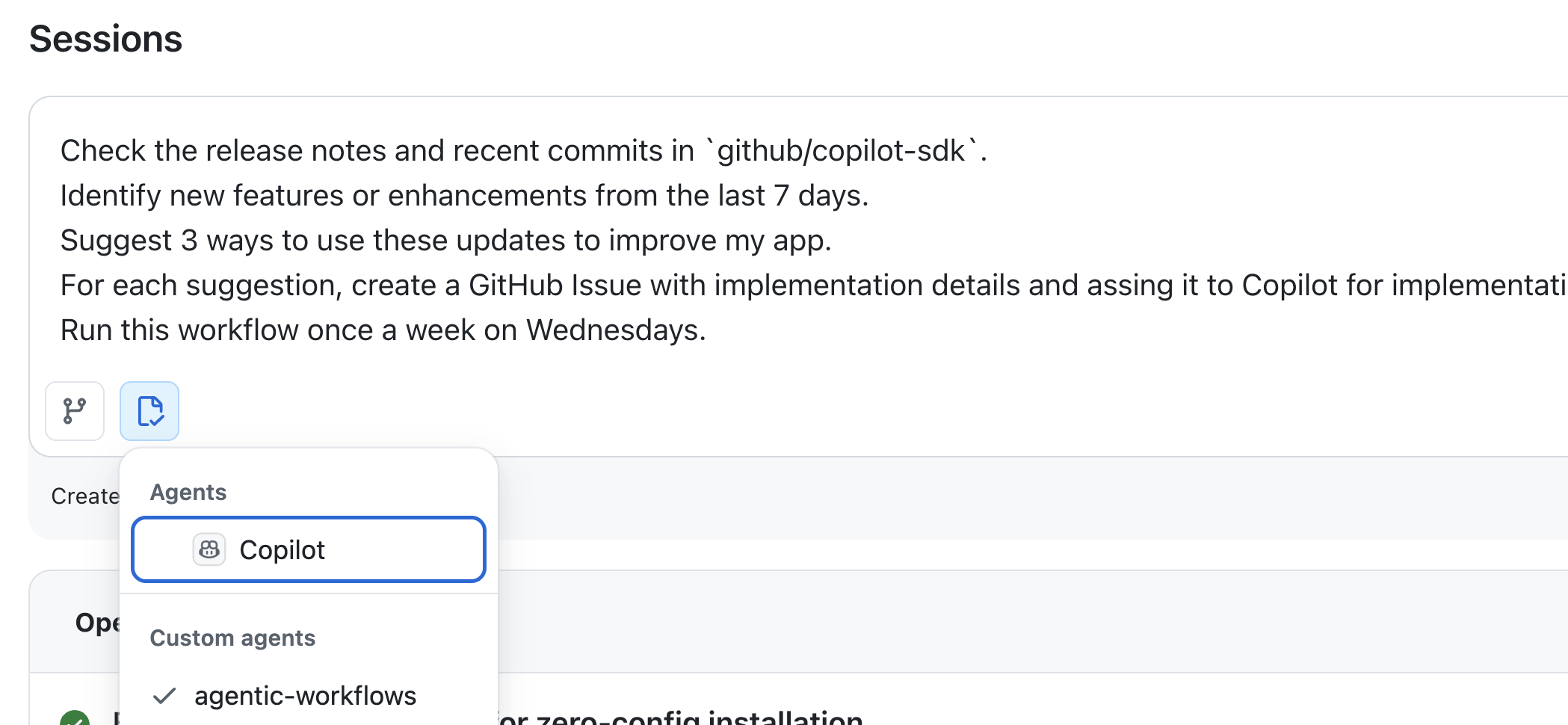 Selecting the agentic-workflows custom agent to create a new workflow.
CCA got to work and in a few minutes I had a PR with the new workflow. I checked through the markdown quickly, and it looked good - the frontmatter had the correct triggers and permissions, and the body had a clear description of the intent. I merged the PR, and now every Wednesday, this workflow runs, checks the SDK for updates, creates issues with enhancement suggestions, and assigns them to Copilot for implementation. I review the PRs that Copilot creates when I’m ready, provide feedback, and merge what makes sense.
Let’s take a quick look at the markdown file - but remember, you don’t need to mess around with the markdown or YAML - just talk to your agent in natural language and let it do the work for you!
---
description: Weekly analysis of Copilot SDK releases and commits to suggest project enhancements
on:
  schedule: weekly on wednesday
permissions:
  contents: read
  issues: read
  pull-requests: read
tools:
  github:
    toolsets: [default]
safe-outputs:
  create-issue:
    title-prefix: "[enhancement] "
    labels: [enhancement, ai-suggestion]
    assignees: [copilot]
    max: 3
  assign-to-agent:
    name: copilot
    max: 3
---

# Weekly Enhancement Suggestions

You are an AI agent that monitors the GitHub Copilot SDK (`github/copilot-sdk`) for new releases, features, and changes, then suggests how they can be leveraged in the Planeteer project.

## Context

This repository contains **Planeteer**, an AI-powered work breakdown and parallel execution TUI built with Ink (React for terminals) and TypeScript. Planeteer depends on **`@github/copilot-sdk`** for AI-powered project planning and execution. All Copilot SDK interactions are isolated in `src/services/copilot.ts`.

## Your Task

1. **Gather recent activity** from the last 7 days in the **`github/copilot-sdk`** repository (https://github.com/github/copilot-sdk):
   - List recent releases and release notes
   - List recent commits to the `main` branch from the past week
   - Review any notable changes, new features, bug fixes, API updates, or deprecations

2. **Review this project** (`${{ github.repository }}`) to understand how the Copilot SDK is currently used:
   - Read `src/services/copilot.ts` to understand the current SDK integration points
   - Check `package.json` for the current SDK version
   - Understand the project architecture to identify where SDK updates could have impact

3. **Analyze the Copilot SDK changes** and identify opportunities for this project:
   - Determine which new SDK features or API changes could benefit Planeteer
   - Consider new capabilities that could improve the clarification, breakdown, refinement, or execution flows
   - Identify any deprecations or breaking changes that require attention
   - Think about how new SDK features could unlock better UX, performance, or reliability

4. **Create exactly 3 enhancement suggestions** as GitHub issues in this repo. Each issue should:
   - Have a clear, descriptive title summarizing the enhancement
   - Include a detailed body with:
     - **Background**: What recent Copilot SDK commit(s) or release(s) inspired this suggestion, with links to the relevant changes in `github/copilot-sdk`
     - **Proposal**: A clear description of how to leverage this SDK update in Planeteer
     - **Benefit**: Why this enhancement would improve the project
     - **Acceptance Criteria**: Specific, measurable criteria for completion
   - Be actionable and scoped appropriately for a single task

5. **Assign each issue to Copilot** for implementation using the `assign-to-agent` safe output.

## Guidelines

- Focus on practical, high-value enhancements that take advantage of new Copilot SDK capabilities.
- Each suggestion should be independent and self-contained.
- Ensure suggestions are diverse — cover different aspects of the project (e.g., one for new SDK features, one for performance or reliability improvements, one for UX enhancements enabled by SDK updates).
- If there are no releases or commits in the Copilot SDK repo in the last week, base your suggestions on the current SDK capabilities that Planeteer is not yet using.
- When referencing recent activity, attribute changes to the humans who authored them, not to bots or automation tools.
- Use GitHub-flavored markdown for issue bodies.

## Safe Outputs

- Use `create-issue` to create each of the 3 enhancement issues.
- Use `assign-to-agent` to assign Copilot to each created issue.
- If for any reason you cannot identify meaningful enhancements, use the `noop` safe output with a message explaining why.
You can see how the frontmatter defines the triggers, permissions, tools and safe outputs, while the body describes the intent in natural language.
Here’s an example of one of the issues that gets created by the workflow. And since the workflow assigns the issue to Copilot, you can see the PR that Copilot creates to implement the issue as well: example PR.
If I click “Edit” on the Issue body, I also see the following hidden HTML metadata:
<!-- gh-aw-agentic-workflow: Weekly Enhancement Suggestions, engine: copilot, run: https://github.com/colindembovsky/planeteer/actions/runs/21970499900 -->

<!-- gh-aw-workflow-id: weekly-enhancement-suggestions -->
Searching weekly-enhancement-suggestions in the repo yields code references (to the workflow files) as well as any issues created by the workflow, and you can easily correlate these together to trace outputs back to the specific workflow run and its associated markdown instructions.
A New Way of Thinking: Intent Over Implementation
This is the mindset shift that matters most. For over a decade, “automation” has meant “write the steps.” Need to check an API? Write a curl command, parse the JSON, handle errors, format the output. Need to create an issue? Construct the body string, call gh issue create, capture the URL.
Agentic Workflows ask a different question: what do you want to happen?
You don’t script the API call. You don’t build the JSON parser. You don’t format the issue body. You describe the outcome, and the agent handles the implementation. The framework provides the guardrails that make this safe: read-only execution by default, writes only through scoped “safe output” jobs, network egress controls via a firewall, and AI-powered threat detection that scans all outputs before they’re externalized.
This isn’t “vibe coding your CI.” The structure is there. The security is there. The deterministic parts of your pipeline stay deterministic. But the intelligent, context-dependent tasks that you’ve been putting off (or doing manually) can now be expressed as intent.
Think of it this way: you wouldn’t write YAML to tell a teammate how to review a PR. You’d say “check if the tests pass, flag any security concerns, and make sure the docs are updated.” Agentic Workflows let you talk to your automation the same way.
Failed Build Autofix
In a past post I outlined the “manual way” to create “self-healing DevOps”. This can now be replaced by a prompt like this to CCA using the agentic-workflow custom agent:
Create a workflow that runs on every failed build. The workflow should analyze the build logs, identify the root cause of the failure, and if it's a common issue with a known fix, automatically create a PR with the fix and assign it to Copilot for implementation.
Much easier!
Patterns worth exploring
The planeteer SDK monitor is just one pattern. The Agentic Workflows gallery showcases several others:
- DailyOps: Generate a daily repo status report - open PRs, stale issues, CI health, contributor activity
- IssueOps: Auto-triage incoming issues, add labels, request clarification, and route to the right team
- ChatOps: Respond to PR comments with agent-driven code analysis, suggestions, or documentation
- Continuous Documentation: Keep READMEs, API docs, and architecture diagrams in sync with code changes
- Failure Analysis: Analyze CI failures and create remediation issues (the structured evolution of my self-healing DevOps approach)
- Multi-Repo Orchestration: Coordinate changes across multiple repositories when a shared dependency updates
The common thread is that these are all tasks where you know what you want but the how requires judgment and context. That’s exactly the sweet spot for Agentic Workflows.
Security considerations
Giving an AI agent write access to a repo sounds terrifying. But Agentic Workflows are designed with security in mind. Here’s why the security model matters:
- Read-only by default: The agent runs in a sandboxed container with read-only access. It can browse code, read issues, and fetch data, but it can’t write anything during execution.
- Safe Outputs: Writes happen in separate jobs with explicitly scoped permissions. If your workflow only declares
issuesas a safe output, the agent can’t push code or merge PRs, even if you accidentally instruct it to. - Agent Workflow Firewall: The agent container uses iptables-based network egress controls via a Squid proxy. You can allowlist specific domains and block everything else.
- Threat Detection: Before any safe output is externalized, an AI-powered pipeline scans for secret leaks, malicious patches, injection attempts, and policy violations.
- Content Sanitization: Inputs are scrubbed of
@mentions, bot triggers, HTML/XML tags, and untrusted URIs to prevent injection attacks.
When creating or updating workflows, the compilation step (gh aw compile) bakes all of this into the .lock.yml file. You can audit it, review it, and version-control it just like any other Actions workflow.
Tips and Gotchas
- Start small: Try one workflow in one repo. A daily status report or issue triage is a great first candidate. Get comfortable with the model before scaling up.
- Iterate on the body, not the frontmatter: Edits to the markdown instructions take effect on the next run without recompilation. Frontmatter changes (triggers, permissions, engine) require
gh aw compile. Even better - don’t edit the markdown at all. Just instruct CCA (using the agentic workflow custom agent) to update the workflow for you. - Cost awareness: The Copilot engine uses 1-2 premium requests per run. Track usage with
gh aw logs. If you’re running daily across many repos, the costs add up. - Use
workflow_dispatchfor testing: By default, agentic workflows include aworkflow_dispatchtrigger so that you can manually trigger workflows without waiting for the schedule. - Be specific in your instructions: Agents perform better with clear, structured prompts. List steps, define priorities, and handle edge cases explicitly. Think of the markdown body as a detailed brief for a capable but literal colleague. There’s no limit to the number of workflows, so you can even break complex processes into multiple smaller workflows that call each other via issue creation or repository dispatch.
Note: Agentic Workflows are actively evolving. Expect changes to the CLI, engine options, and security features. Pin to specific versions and monitor the documentation for updates.
Conclusion
Agentic Workflows represent a fundamental shift in how we think about automation. Instead of scripting steps in YAML, you declare intent. Instead of building one-off integrations, you describe outcomes and let AI agents handle execution. The combination of Agentic Workflows, GitHub Actions, and Copilot creates a natural language continuous AI loop where your codebase improves itself - with you in the decision seat, not the execution treadmill.
The Planeteer example shows what this looks like in practice: a few sentences of intent replace hours of manual SDK tracking, issue creation, and implementation work. Every Wednesday, the loop runs. Issues appear. Copilot submits PRs. I review and merge. The app evolves.
This is one example of why the GitHub platform is so powerful. We provide the building blocks - Actions for automation, Copilot for intelligence, and now Agentic Workflows for intent-driven development. The possibilities are endless, and we’re just scratching the surface of what’s possible when you combine these capabilities.
Happy automating!